 integrated.ee
Recently I had to validate some filter selections on a report in Business Central and found out it was not so straight forward to do. What happened when using the trigger OnPreDataItem() or trigger OnPreReport() triggers was that I was able to validate the filter selections by user but the user experience was not optimal since the selection page closed when the validation error occured.
What I came up with was using the trigger OnQueryClosePage(CloseAction: Action): Boolean trigger on the requestpage itself.
Here's the sample report:
report 50100 Customers
{
 UsageCategory = ReportsAndAnalysis;
 ApplicationArea = All;
 DefaultRenderingLayout = LayoutName;
 Caption = 'Customer Report';
 dataset
 {
 dataitem(Customer; Customer)
 {
 RequestFilterFields ="Gen. Bus. Posting Group","Customer Posting Group";
 column(Name; Name)
 {

 }
 column(Amount; Amount)
 {

 }
 }
 }

 requestpage
 {
 layout
 {

 }
 trigger OnQueryClosePage(CloseAction: Action): Boolean
 begin
 if CloseAction = Action::Cancel then
 exit
 else begin
 ValidateFilter(Customer.GetFilter("Gen. Bus. Posting Group"), Customer.FieldCaption("Gen. Bus. Posting Group"));
 ValidateFilter(Customer.GetFilter("Customer Posting Group"), Customer.FieldCaption("Customer Posting Group"));
 end;
 end;

 }
 rendering
 {
 layout(LayoutName)
 {
 Type = RDLC;
 LayoutFile = 'report.rdlc';
 }
 }

 local procedure ValidateFilter(Filter: Text; FieldCaption: Text)
 var
 ErrFieldValueMissingInSelection: Label 'Please select filter for field: %1';
 begin
 if Filter = '' then
 Error(ErrFieldValueMissingInSelection, FieldCaption);
 end;
}
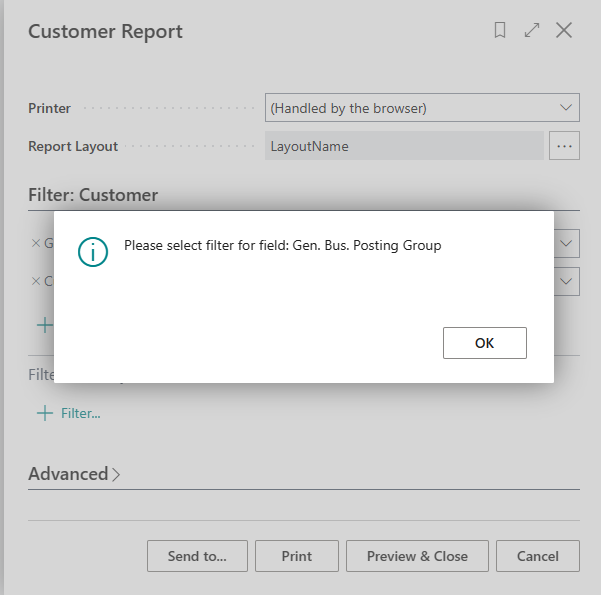
Theres a generic procedure local procedure ValidateFilter(Filter: Text; FieldCaption: Text) that you can pass on any field filter and value and it will validate that and show error before the report is run:
I think this way the user experience is quite good for validating the request page fields before the report is run.